

APPENDIX 1
🎯 Mod Tool - Unpack/Edit/Pack SCS Files Easily 🎯
ETS2 - Route of the Wolves Guide
We will edit a few mods in the guide, you can follow these instructions on how to do it.
In ETS2, game files are in .scs format most of the time. To open, edit, and compress back these types of files, we need an official tool from SCS: scs_packer.exe.
⚠️ IMPORTANT DISCLAIMER
This guide is for personal use only. Do not modify a mod author’s work and publish it as your own without their express and clear permission. Please respect the time and effort mod creators put into their work.
📁 Understanding the Folder Structure:
Before we begin, it’s crucial to understand the folder structure that our tool expects:
⚠️ CRITICAL RULE:
Never nest further than
Mods\Unpacked\mod_name\files✅ CORRECT:
Mods\Unpacked\motorcycle_traffic_pack\files❌ WRONG:
Mods\Unpacked\motorcycle_traffic_pack\extra_folder\files
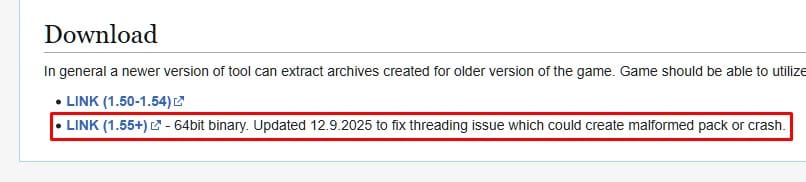
Step 1: Download the Official SCS Tool
Download the scs_packer_1.55+.zip (or newer version)
Do not rename or modify the downloaded file yet
Step 2: Create Your Working Folder
Choose a drive with plenty of free space (C:, D:, etc.)
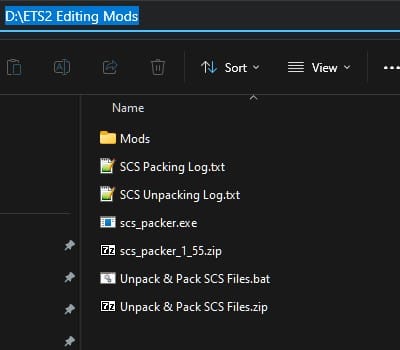
Create a main folder named
ETS2-ATS Editing Modsdirectly on that driveExample:
D:\ETS2-ATS Editing Mods(not inside Documents or Program Files)Place the downloaded ZIP inside this folder as a backup
Extract
scs_packer.exefrom the ZIP:Right-click the ZIP file
Select “Extract All” (Windows native) or use 7-Zip
Make sure
scs_packer.exeis directly inD:\ETS2 Editing Mods
Step 3: Install 7-Zip (Required)
Our tool uses 7-Zip to handle archives like .zip, .rar, and .7z.
Go to 7-zip.org
Download and install the version matching your Windows (64-bit recommended)
Default installation location is
C:\Program Files\7-Zip\7z.exe– our tool will find it automatically
Step 4: Download (or create) the batch tool (.bat) to automatize the process
Option A: Download Ready-Made (Easiest)
In order to use the tool we need to open a Windows PowerShell and execute command lines. But instead, we are going to automatize it using a batch of our own making that will make the decompressing and compressing much easier.
Download ETS2-ATS Mod Tool v1.2.zip from my Google Drive directly. (if the link does not work, go to Visit the file directly at Google Drive to download it manually)
Extract the ZIP file
Place
Unpack - Pack SCS Files.batinside yourx:\ETS2-ATS Editing Modsfolder
Option B: Create It Yourself (For Transparency)
If you prefer to see exactly what’s in the script:
Download Notepad++ (recommended over Windows Notepad)
Go to notepad-plus-plus.org
Click the green “Download” button
Run the installer (just click “Next” a few times)
Copy the code from the expandable section below:
View the Batch File Code:
@echo off
cls
setlocal enabledelayedexpansion

:: ============================================================
::  ETS2 Mod Tool v1.1
::  Supports: .scs (native + zip-type), .rar, .7z, .zip
::  Requires: scs_packer.exe in same folder, 7-Zip installed
:: ============================================================

set "ROOT_FOLDER=%~dp0"
if "%ROOT_FOLDER:~-1%"=="\" set "ROOT_FOLDER=%ROOT_FOLDER:~0,-1%"
:: Trim any trailing spaces (can occur if folder name has trailing space)
for /f "tokens=* delims= " %%A in ("%ROOT_FOLDER%") do set "ROOT_FOLDER=%%~A"

:: Warn if path contains & which breaks batch redirects
echo "%ROOT_FOLDER%" | find "&" >nul 2>&1
if not errorlevel 1 (
    cls
    echo ========================================
    echo  WARNING: Problem detected in tool path
    echo ========================================
    echo.
    echo  The folder containing this tool has an
    echo  ampersand ^(&^) in its name or path:
    echo  %ROOT_FOLDER%
    echo.
    echo  This will cause errors. Please rename
    echo  the folder to remove the ^& symbol.
    echo  Example: "ETS2 ^& ATS Tools" ^-^> "ETS2_ATS_Tools"
    echo.
    pause
    exit /b
)
set "MODS_FOLDER=%ROOT_FOLDER%\Mods"
set "UNPACKED_FOLDER=%MODS_FOLDER%\Unpacked"
set "PACKED_FOLDER=%MODS_FOLDER%\Packed"
set "TEMP_FOLDER=%ROOT_FOLDER%\Mods\_temp_extract"
set "LOG_UNPACK=%ROOT_FOLDER%\SCS Unpacking Log.txt"
set "LOG_PACK=%ROOT_FOLDER%\SCS Packing Log.txt"
set "TMP_RESULT=%TEMP%\ets2_dialog_result.txt"
set "TMP_FILELIST=%TEMP%\ets2_filelist.txt"
set "MARKER_FILE=_ets2_unpack_info.txt"

:: --- Locate 7-Zip ---
set "SEVENZIP="
if exist "C:\Program Files\7-Zip\7z.exe"       set "SEVENZIP=C:\Program Files\7-Zip\7z.exe"
if exist "C:\Program Files (x86)\7-Zip\7z.exe" set "SEVENZIP=C:\Program Files (x86)\7-Zip\7z.exe"

:: Create required folders
if not exist "%MODS_FOLDER%"     mkdir "%MODS_FOLDER%"     2>nul
if not exist "%UNPACKED_FOLDER%" mkdir "%UNPACKED_FOLDER%" 2>nul
if not exist "%PACKED_FOLDER%"   mkdir "%PACKED_FOLDER%"   2>nul

:: ============================================================
:menu
cls
echo ========================================
echo     ETS2 Mod Tool v1.1
echo ========================================
echo.
echo     1. Unpack Mod  (.scs  .rar  .7z  .zip)
echo     2. Pack Mod    (folder to .scs or archive)
echo     3. Exit
echo.
if "%SEVENZIP%"=="" (
    echo  [!] 7-Zip not found - only .scs files supported
    echo      Install 7-Zip to enable .rar/.7z/.zip support
    echo.
)
:: Flush any stale keypresses from stdin before showing the menu choice
powershell -NoProfile -Command "while([Console]::KeyAvailable){[Console]::ReadKey($true)|Out-Null}" 2>nul
choice /c 123 /n /m "Select option: " 2>nul

if errorlevel 3 goto :do_exit
if errorlevel 2 goto :pack
if errorlevel 1 goto :unpack

:: ============================================================
:unpack
cls
echo ETS2 Mod Extractor
echo.
echo Opening file selector...

if exist "%TMP_RESULT%" del "%TMP_RESULT%"

if not "%SEVENZIP%"=="" (
    powershell -NoProfile -Command "Add-Type -AssemblyName System.Windows.Forms; $d = New-Object System.Windows.Forms.OpenFileDialog; $d.InitialDirectory = '%MODS_FOLDER%'; $d.Filter = 'Mod Files|*.scs;*.rar;*.7z;*.zip'; $d.Title = 'Select a mod file'; [void]$d.ShowDialog(); $d.FileName | Out-File -FilePath '%TMP_RESULT%' -Encoding ASCII -NoNewline"
) else (
    powershell -NoProfile -Command "Add-Type -AssemblyName System.Windows.Forms; $d = New-Object System.Windows.Forms.OpenFileDialog; $d.InitialDirectory = '%MODS_FOLDER%'; $d.Filter = 'SCS Files|*.scs'; $d.Title = 'Select a mod file'; [void]$d.ShowDialog(); $d.FileName | Out-File -FilePath '%TMP_RESULT%' -Encoding ASCII -NoNewline"
)

set "MODFILE="
if exist "%TMP_RESULT%" (
    set /p MODFILE=<"%TMP_RESULT%"
    del "%TMP_RESULT%" 2>nul
)

if not defined MODFILE (
    echo No file selected.
    pause
    goto :menu
)
if "%MODFILE%"=="" (
    echo No file selected.
    pause
    goto :menu
)

for %%F in ("%MODFILE%") do (
    set "MODNAME=%%~nF"
    set "MODEXT=%%~xF"
)

set "MODEXT_L=%MODEXT%"
if /i "%MODEXT%"==".SCS" set "MODEXT_L=.scs"
if /i "%MODEXT%"==".RAR" set "MODEXT_L=.rar"
if /i "%MODEXT%"==".7Z"  set "MODEXT_L=.7z"
if /i "%MODEXT%"==".ZIP" set "MODEXT_L=.zip"

echo File : %MODNAME%%MODEXT%
echo.

if "%MODEXT_L%"==".scs" goto :unpack_single_scs
if "%MODEXT_L%"==".rar"  goto :unpack_archive
if "%MODEXT_L%"==".7z"   goto :unpack_archive
if "%MODEXT_L%"==".zip"  goto :unpack_archive

echo Unknown file type. Aborting.
pause
goto :menu

:: ============================================================
:unpack_single_scs
set "SCS_FILE=%MODFILE%"
set "SCS_NAME=%MODNAME%"
call :try_unpack_scs
echo.
echo Log updated: %LOG_UNPACK%
pause
goto :menu

:: ============================================================
:unpack_archive
if "%SEVENZIP%"=="" (
    echo 7-Zip is required to unpack archive files.
    echo Please install 7-Zip from https://www.7-zip.org/
    pause
    goto :menu
)

if exist "%TEMP_FOLDER%" rmdir /s /q "%TEMP_FOLDER%" 2>nul
mkdir "%TEMP_FOLDER%" 2>nul

echo Extracting archive...
:: 7-Zip: -o flag must have NO space before the path, path must be quoted
"%SEVENZIP%" x "%MODFILE%" "-o%TEMP_FOLDER%" -y >nul 2>&1

:: Count files (not folders) in temp using PowerShell to handle spaces safely
set "TEMP_COUNT=0"
powershell -NoProfile -Command "(Get-ChildItem -Path '%TEMP_FOLDER%' -Recurse -File -ErrorAction SilentlyContinue).Count | Out-File '%TMP_RESULT%' -Encoding ASCII -NoNewline" 2>nul
if exist "%TMP_RESULT%" (
    set /p TEMP_COUNT=<"%TMP_RESULT%"
    del "%TMP_RESULT%" 2>nul
)

if "%TEMP_COUNT%"=="0" (
    echo [FAIL] Archive extraction produced no files.
    echo        The archive may be password-protected or corrupted.
    call :log_unpack_error "%MODNAME%%MODEXT%" "7-Zip extraction produced no files"
    rmdir /s /q "%TEMP_FOLDER%" 2>nul
    pause
    goto :menu
)

echo Extracted %TEMP_COUNT% file(s) from archive.
echo.

:: Count .scs files at top level - use PowerShell to handle spaces in path
set "SCS_COUNT=0"
powershell -NoProfile -Command "(Get-ChildItem -Path '%TEMP_FOLDER%' -Filter '*.scs' -File -ErrorAction SilentlyContinue).Count | Out-File '%TMP_RESULT%' -Encoding ASCII -NoNewline" 2>nul
if exist "%TMP_RESULT%" (
    set /p SCS_COUNT=<"%TMP_RESULT%"
    del "%TMP_RESULT%" 2>nul
)

if "%SCS_COUNT%"=="0" goto :archive_direct_files

:: ============================================================
::  Archive contains .scs files - build numbered list via PowerShell
:: ============================================================
echo Found %SCS_COUNT% .scs file(s) inside the archive.
echo.

:: Write list of .scs files to a temp file, one per line
powershell -NoProfile -Command "Get-ChildItem -Path '%TEMP_FOLDER%' -Filter '*.scs' -File -ErrorAction SilentlyContinue | ForEach-Object { $_.FullName } | Out-File '%TMP_FILELIST%' -Encoding ASCII" 2>nul

set "IDX=0"
for /f "usebackq delims=" %%F in ("%TMP_FILELIST%") do (
    set /a IDX+=1
    set "SCS_ITEM_!IDX!=%%~nxF"
    set "SCS_PATH_!IDX!=%%~fF"
)
set "SCS_MAX=%IDX%"
if exist "%TMP_FILELIST%" del "%TMP_FILELIST%"

:archive_pick_show
echo ----------------------------------------
echo Available .scs files:
echo.
for /l %%N in (1,1,%SCS_MAX%) do (
    echo     %%N. !SCS_ITEM_%%N!
)
echo.
echo     A. Unpack ALL
echo     0. Back to main menu
echo.

:archive_pick_input
set "PICK="
set /p "PICK=Which .scs do you want to unpack? "

if "%PICK%"=="0" (
    rmdir /s /q "%TEMP_FOLDER%" 2>nul
    goto :menu
)

:: Unpack all
if /i "%PICK%"=="A" goto :archive_unpack_all

set "VALID=0"
for /l %%N in (1,1,%SCS_MAX%) do (
    if "%PICK%"=="%%N" set "VALID=1"
)
if "%VALID%"=="0" (
    echo Invalid choice. Enter a number, A to unpack all, or 0 to go back.
    echo.
    goto :archive_pick_input
)

:: Unpack single chosen .scs
set "SCS_FILE=!SCS_PATH_%PICK%!"
for %%F in ("!SCS_FILE!") do set "SCS_NAME=%%~nF"

echo.
echo Processing: !SCS_ITEM_%PICK%!
echo.
call :try_unpack_scs
echo.
echo Log updated: %LOG_UNPACK%
echo.

if %SCS_MAX% equ 1 (
    rmdir /s /q "%TEMP_FOLDER%" 2>nul
    pause
    goto :menu
)

:: Unpack another? - default N, 6s countdown
echo ----------------------------------------
echo Unpack another .scs from this archive?
echo Press Y to continue, or N to return to main menu.
echo.
powershell -NoProfile -Command "$key='N'; $done=$false; for($i=6;$i -ge 1 -and -not $done;$i--){ Write-Host -NoNewline ('  Continuing in ' + $i + ' sec... (Y/N): '); $sw=[System.Diagnostics.Stopwatch]::StartNew(); while($sw.Elapsed.TotalSeconds -lt 1){ if([Console]::KeyAvailable){ $key=[Console]::ReadKey($true).KeyChar.ToString().ToUpper(); $done=$true; break } }; Write-Host '' }; Write-Host ''; $key | Out-File '%TMP_RESULT%' -Encoding ASCII -NoNewline" 2>nul

set "UNPACK_ANOTHER=N"
if exist "%TMP_RESULT%" (
    set /p UNPACK_ANOTHER=<"%TMP_RESULT%"
    del "%TMP_RESULT%" 2>nul
)

if /i "%UNPACK_ANOTHER%"=="Y" (
    echo.
    goto :archive_pick_show
)
rmdir /s /q "%TEMP_FOLDER%" 2>nul
goto :menu

:: ============================================================
::  Unpack all .scs files from archive, each to its own folder
:: ============================================================
:archive_unpack_all
echo.
echo Unpacking all %SCS_MAX% files...
echo.
set "_ALL_IDX=1"

:archive_unpack_all_loop
if %_ALL_IDX% gtr %SCS_MAX% goto :archive_unpack_all_done

echo ----------------------------------------
echo [%_ALL_IDX%/%SCS_MAX%] Processing: !SCS_ITEM_%_ALL_IDX%!
echo.
set "SCS_FILE=!SCS_PATH_%_ALL_IDX%!"
set "SCS_NAME=!SCS_ITEM_%_ALL_IDX%!"
:: Strip extension from SCS_NAME
set "SCS_NAME=!SCS_NAME:~0,-4!"
call :try_unpack_scs
echo.
set /a _ALL_IDX+=1
goto :archive_unpack_all_loop

:archive_unpack_all_done
echo ----------------------------------------
echo All done. Log updated: %LOG_UNPACK%
rmdir /s /q "%TEMP_FOLDER%" 2>nul
powershell -NoProfile -Command "1..6 | ForEach-Object { $s = 7 - $_; Write-Host ('  Returning to main menu in ' + $s + ' sec...'); Start-Sleep -Seconds 1 }"
goto :menu

:: ============================================================
:archive_direct_files
:: No .scs inside - move all extracted files to Unpacked\<modname>
echo No .scs files found. Moving extracted contents directly...

set "OUTPUTFOLDER=%UNPACKED_FOLDER%\%MODNAME%"
if not exist "%OUTPUTFOLDER%" mkdir "%OUTPUTFOLDER%" 2>nul

robocopy "%TEMP_FOLDER%" "%OUTPUTFOLDER%" /e /move /nfl /ndl /njh /njs >nul 2>&1
rmdir /s /q "%TEMP_FOLDER%" 2>nul

:: Count with PowerShell to handle spaces in path
set "FILE_COUNT=0"
powershell -NoProfile -Command "(Get-ChildItem -Path '%OUTPUTFOLDER%' -Recurse -File -ErrorAction SilentlyContinue).Count | Out-File '%TMP_RESULT%' -Encoding ASCII -NoNewline" 2>nul
if exist "%TMP_RESULT%" (
    set /p FILE_COUNT=<"%TMP_RESULT%"
    del "%TMP_RESULT%" 2>nul
)

if "%FILE_COUNT%"=="0" (
    echo [FAIL] No files were moved. Check the archive manually.
    call :log_unpack_error "%MODNAME%%MODEXT%" "No usable files found in archive"
    rmdir /s /q "%OUTPUTFOLDER%" 2>nul
    echo.
    echo Log updated: %LOG_UNPACK%
    pause
    goto :menu
)

echo [OK] Moved %FILE_COUNT% files to:
echo      %OUTPUTFOLDER%
call :log_unpack_success "%MODNAME%%MODEXT%" "%OUTPUTFOLDER%" "7-Zip direct"
echo.
echo Log updated: %LOG_UNPACK%
pause
goto :menu

:: ============================================================
:pack
cls
echo ETS2 Mod Packer
echo.
echo Opening folder selector...

if exist "%TMP_RESULT%" del "%TMP_RESULT%"

powershell -NoProfile -Command "Add-Type -AssemblyName System.Windows.Forms; $d = New-Object System.Windows.Forms.FolderBrowserDialog; $d.SelectedPath = '%UNPACKED_FOLDER%'; $d.Description = 'Select the mod folder to pack'; [void]$d.ShowDialog(); $d.SelectedPath | Out-File -FilePath '%TMP_RESULT%' -Encoding ASCII -NoNewline"

set "FOLDER="
if exist "%TMP_RESULT%" (
    set /p FOLDER=<"%TMP_RESULT%"
    del "%TMP_RESULT%" 2>nul
)

if not defined FOLDER (
    echo No folder selected.
    pause
    goto :menu
)
if "%FOLDER%"=="" (
    echo No folder selected.
    pause
    goto :menu
)

for %%F in ("%FOLDER%") do set "FOLDERNAME=%%~nxF"

:: --- Read marker file if present ---
set "WAS_UNCOMPRESSED=0"
if exist "%FOLDER%\%MARKER_FILE%" (
    for /f "usebackq tokens=1,* delims==" %%A in ("%FOLDER%\%MARKER_FILE%") do (
        if "%%A"=="uncompressed" set "_marker_unc=%%B"
    )
    if /i "!_marker_unc!"=="yes" set "WAS_UNCOMPRESSED=1"
)

:: ============================================================
::  PACK - Choose output format
:: ============================================================
cls
echo ========================================
echo     ETS2 Mod Tool v1.1  -  Packer
echo ========================================
echo.
echo  Mod folder : %FOLDERNAME%
echo.
echo  Choose output format:
echo.
echo     1. Pack to .scs  (ETS2 native format)
echo     2. Pack to archive  (.zip / .rar / .7z)
echo.
choice /c 12 /n /m "Select format: " 2>nul
if errorlevel 2 goto :pack_archive_format
if errorlevel 1 goto :pack_scs_compress

:: ============================================================
::  PACK SCS - Compression prompt
:: ============================================================
:pack_scs_compress
cls
echo ========================================
echo     ETS2 Mod Tool v1.1  -  Pack to .scs
echo ========================================
echo.
echo  Mod folder : %FOLDERNAME%
echo.

set "COMPRESS_DEFAULT=Yes"

if "%WAS_UNCOMPRESSED%"=="1" (
    echo  [!] NOTICE: This mod was originally NOT compressed.
    echo      The .scs and unpacked folder were the same size.
    echo      Packing WITHOUT compression is recommended.
    echo.
    set "COMPRESS_DEFAULT=No"
)

echo  Compress the .scs?  Y=Yes  N=No  (default: %COMPRESS_DEFAULT%)
echo.

powershell -NoProfile -Command "$def='%COMPRESS_DEFAULT%'; $key=$def; $done=$false; for($i=6;$i -ge 1 -and -not $done;$i--){ Write-Host -NoNewline ('  Continuing in ' + $i + ' sec... (Y/N): '); $sw=[System.Diagnostics.Stopwatch]::StartNew(); while($sw.Elapsed.TotalSeconds -lt 1){ if([Console]::KeyAvailable){ $k=[Console]::ReadKey($true).KeyChar.ToString().ToUpper(); if($k -eq 'Y' -or $k -eq 'N'){ $key=$k; $done=$true; break } } }; Write-Host '' }; Write-Host ''; $key | Out-File '%TMP_RESULT%' -Encoding ASCII -NoNewline" 2>nul

set "COMPRESS=%COMPRESS_DEFAULT%"
if exist "%TMP_RESULT%" (
    set /p COMPRESS=<"%TMP_RESULT%"
    del "%TMP_RESULT%" 2>nul
)
if /i "%COMPRESS%"=="Y" set "COMPRESS=Yes"
if /i "%COMPRESS%"=="N" set "COMPRESS=No"

echo  Compression : %COMPRESS%
echo.

set "OUTPUT=%PACKED_FOLDER%\%FOLDERNAME%.scs"
if exist "%OUTPUT%" del /f /q "%OUTPUT%" >nul 2>&1

echo  Packing to "%FOLDERNAME%.scs"...
echo.

cd /d "%ROOT_FOLDER%"
if /i "%COMPRESS%"=="Yes" (
    scs_packer.exe create "%OUTPUT%" -root "Mods\Unpacked\%FOLDERNAME%" 2>nul
) else (
    scs_packer.exe create "%OUTPUT%" -root "Mods\Unpacked\%FOLDERNAME%" -nocompress 2>nul
)

timeout /t 2 >nul
goto :pack_result_check

:: ============================================================
::  PACK ARCHIVE - Choose format
:: ============================================================
:pack_archive_format
if "%SEVENZIP%"=="" (
    echo.
    echo  [!] 7-Zip is required to create archives.
    echo      Install 7-Zip from https://www.7-zip.org/
    pause
    goto :menu
)

cls
echo ========================================
echo     ETS2 Mod Tool v1.1  -  Pack to Archive
echo ========================================
echo.
echo  Mod folder : %FOLDERNAME%
echo.
echo  Choose archive format:
echo     1 = .zip (default)    2 = .rar    3 = .7z
echo.

powershell -NoProfile -Command "$key='1'; $done=$false; for($i=6;$i -ge 1 -and -not $done;$i--){ Write-Host -NoNewline ('  Continuing in ' + $i + ' sec... (1/2/3): '); $sw=[System.Diagnostics.Stopwatch]::StartNew(); while($sw.Elapsed.TotalSeconds -lt 1){ if([Console]::KeyAvailable){ $k=[Console]::ReadKey($true).KeyChar.ToString(); if($k -eq '1' -or $k -eq '2' -or $k -eq '3'){ $key=$k; $done=$true; break } } }; Write-Host '' }; Write-Host ''; $key | Out-File '%TMP_RESULT%' -Encoding ASCII -NoNewline" 2>nul

set "ARCHIVE_EXT=zip"
set "ARCHIVE_TYPE=zip"
if exist "%TMP_RESULT%" (
    set /p _AFMT=<"%TMP_RESULT%"
    del "%TMP_RESULT%" 2>nul
    if "!_AFMT!"=="2" ( set "ARCHIVE_EXT=rar" & set "ARCHIVE_TYPE=rar" )
    if "!_AFMT!"=="3" ( set "ARCHIVE_EXT=7z"  & set "ARCHIVE_TYPE=7z"  )
)

echo  Format : .%ARCHIVE_EXT%
echo.

set "OUTPUT=%PACKED_FOLDER%\%FOLDERNAME%.%ARCHIVE_EXT%"
if exist "%OUTPUT%" del /f /q "%OUTPUT%" >nul 2>&1

echo  Packing to "%FOLDERNAME%.%ARCHIVE_EXT%"...
echo.

:: 7-Zip: -o flag must have NO space, and path quoted correctly
"%SEVENZIP%" a -t%ARCHIVE_TYPE% "%OUTPUT%" "%FOLDER%\*" >nul 2>&1

timeout /t 2 >nul
goto :pack_result_check

:: ============================================================
:pack_result_check
cls
echo ========================================
echo     ETS2 Mod Tool v1.1
echo ========================================
echo.

set "LOG_DT="
powershell -NoProfile -Command "Get-Date -Format 'yyyy-MM-dd HH:mm:ss'" > "%TMP_RESULT%" 2>nul
if exist "%TMP_RESULT%" ( set /p LOG_DT=<"%TMP_RESULT%" & del "%TMP_RESULT%" 2>nul )

if not exist "%OUTPUT%" goto :pack_failed
for %%F in ("%OUTPUT%") do set "FILESIZE=%%~zF"
if "!FILESIZE!"=="0" goto :pack_failed

if not exist "%LOG_PACK%" (
    echo ======================================= > "%LOG_PACK%"
    echo ETS2 Mod Packing Log >> "%LOG_PACK%"
    echo ======================================= >> "%LOG_PACK%"
    echo. >> "%LOG_PACK%"
)
echo !LOG_DT! >> "%LOG_PACK%"
echo   PACKED      : %FOLDERNAME% >> "%LOG_PACK%"
echo   Output      : %OUTPUT% >> "%LOG_PACK%"
echo   Source      : %FOLDER% >> "%LOG_PACK%"
if defined ARCHIVE_TYPE (
    echo   Format      : .%ARCHIVE_EXT% archive >> "%LOG_PACK%"
) else (
    echo   Format      : .scs >> "%LOG_PACK%"
    echo   Compression : %COMPRESS% >> "%LOG_PACK%"
)
echo   Size        : !FILESIZE! bytes >> "%LOG_PACK%"
echo. >> "%LOG_PACK%"

echo ========================================
echo  SUCCESS!
echo  File : %OUTPUT%
echo  Size : !FILESIZE! bytes
echo ========================================
echo.
echo Log updated: %LOG_PACK%
set "ARCHIVE_TYPE=" & set "ARCHIVE_EXT="
pause
goto :menu

:pack_failed
if "%FOLDERNAME%"=="" goto :menu
if not exist "%LOG_PACK%" (
    echo ======================================= > "%LOG_PACK%"
    echo ETS2 Mod Packing Log >> "%LOG_PACK%"
    echo ======================================= >> "%LOG_PACK%"
    echo. >> "%LOG_PACK%"
)
echo !LOG_DT! >> "%LOG_PACK%"
echo   ERROR       : Failed to pack %FOLDERNAME% >> "%LOG_PACK%"
echo   Source      : %FOLDER% >> "%LOG_PACK%"
echo. >> "%LOG_PACK%"

echo ========================================
echo  ERROR: Failed to pack "%FOLDERNAME%"
echo  The output file was not created.
echo  Make sure the folder contains valid mod files.
echo ========================================
echo.
echo Log updated: %LOG_PACK%
set "ARCHIVE_TYPE=" & set "ARCHIVE_EXT="
pause
goto :menu

:: ============================================================
:do_exit
echo Goodbye!
timeout /t 1 >nul
endlocal
exit /b

:: ============================================================
::  SUBROUTINE: try_unpack_scs
::  Expects: SCS_FILE (full path), SCS_NAME (no extension)
:: ============================================================
:try_unpack_scs
set "OUTPUTFOLDER=%UNPACKED_FOLDER%\%SCS_NAME%"
if not exist "%OUTPUTFOLDER%" mkdir "%OUTPUTFOLDER%" 2>nul

:: Get source file size via PowerShell - pass path via env var to handle spaces
set "SCS_FILESIZE=0"
set "_PS_SCS=%SCS_FILE%"
powershell -NoProfile -Command "(Get-Item -LiteralPath $env:_PS_SCS -ErrorAction SilentlyContinue).Length | Out-File '%TMP_RESULT%' -Encoding ASCII -NoNewline" 2>nul
if exist "%TMP_RESULT%" (
    set /p SCS_FILESIZE=<"%TMP_RESULT%"
    del "%TMP_RESULT%" 2>nul
)

echo   Trying scs_packer.exe...
cd /d "%ROOT_FOLDER%"
scs_packer.exe extract "%SCS_FILE%" -root "Mods\Unpacked\%SCS_NAME%" 2>nul

:: Count output files via PowerShell
set "FILE_COUNT=0"
powershell -NoProfile -Command "(Get-ChildItem -Path '%OUTPUTFOLDER%' -Recurse -File -ErrorAction SilentlyContinue).Count | Out-File '%TMP_RESULT%' -Encoding ASCII -NoNewline" 2>nul
if exist "%TMP_RESULT%" (
    set /p FILE_COUNT=<"%TMP_RESULT%"
    del "%TMP_RESULT%" 2>nul
)

if "%FILE_COUNT%" gtr "0" (
    echo   [OK] scs_packer succeeded  (%FILE_COUNT% files^)
    echo        Output: %OUTPUTFOLDER%
    set "_UNPACK_METHOD=scs_packer"
    goto :try_unpack_scs_write_marker
)

:: --- scs_packer got nothing - try 7-Zip ---
rmdir /s /q "%OUTPUTFOLDER%" 2>nul
mkdir "%OUTPUTFOLDER%" 2>nul

if "%SEVENZIP%"=="" (
    echo   [FAIL] scs_packer produced no files.
    echo          7-Zip not installed - cannot try fallback.
    call :log_unpack_error "%SCS_NAME%.scs" "scs_packer failed; 7-Zip not installed"
    rmdir /s /q "%OUTPUTFOLDER%" 2>nul
    exit /b
)

echo   [..] scs_packer got nothing. Trying 7-Zip fallback...
"%SEVENZIP%" x "%SCS_FILE%" "-o%OUTPUTFOLDER%" -y >nul 2>&1

set "FILE_COUNT=0"
powershell -NoProfile -Command "(Get-ChildItem -Path '%OUTPUTFOLDER%' -Recurse -File -ErrorAction SilentlyContinue).Count | Out-File '%TMP_RESULT%' -Encoding ASCII -NoNewline" 2>nul
if exist "%TMP_RESULT%" (
    set /p FILE_COUNT=<"%TMP_RESULT%"
    del "%TMP_RESULT%" 2>nul
)

if "%FILE_COUNT%"=="0" (
    rmdir /s /q "%OUTPUTFOLDER%" 2>nul
    call :log_unpack_error "%SCS_NAME%.scs" "Both scs_packer and 7-Zip failed"
    echo   [FAIL] Could not unpack "%SCS_NAME%.scs"
    echo          File may be locked, encrypted, or unsupported format.
    exit /b
)

echo   [OK] 7-Zip succeeded  (%FILE_COUNT% files^)
echo        Output: %OUTPUTFOLDER%
set "_UNPACK_METHOD=7zip"

:try_unpack_scs_write_marker
:: Compare folder size vs .scs size to detect uncompressed mods
set "IS_UNCOMPRESSED=no"
set "_PS_FOLDER=%OUTPUTFOLDER%"
set "_PS_SIZE=%SCS_FILESIZE%"
powershell -NoProfile -Command "try { $fs=(Get-ChildItem -LiteralPath $env:_PS_FOLDER -Recurse -File -ErrorAction Stop | Measure-Object -Property Length -Sum).Sum; $ss=[long]$env:_PS_SIZE; if($fs -gt 0 -and $ss/$fs -ge 0.90){'yes'}else{'no'} } catch {'no'}" > "%TMP_RESULT%" 2>nul
if exist "%TMP_RESULT%" (
    set /p IS_UNCOMPRESSED=<"%TMP_RESULT%"
    del "%TMP_RESULT%" 2>nul
)

echo method=!_UNPACK_METHOD!> "%OUTPUTFOLDER%\%MARKER_FILE%"
echo scs_size=%SCS_FILESIZE%>> "%OUTPUTFOLDER%\%MARKER_FILE%"
echo uncompressed=!IS_UNCOMPRESSED!>> "%OUTPUTFOLDER%\%MARKER_FILE%"

if "!_UNPACK_METHOD!"=="7zip" (
    call :log_unpack_success "%SCS_NAME%.scs" "%OUTPUTFOLDER%" "7-Zip (ZIP-type .scs)"
    exit /b
)
call :log_unpack_success "%SCS_NAME%.scs" "%OUTPUTFOLDER%" "scs_packer"
exit /b

:: ============================================================
:log_unpack_success
set "LOG_DT="
powershell -NoProfile -Command "Get-Date -Format 'yyyy-MM-dd HH:mm:ss'" > "%TMP_RESULT%" 2>nul
if exist "%TMP_RESULT%" ( set /p LOG_DT=<"%TMP_RESULT%" & del "%TMP_RESULT%" 2>nul )
if not exist "%LOG_UNPACK%" (
    echo ======================================= > "%LOG_UNPACK%"
    echo ETS2 Mod Unpacking Log >> "%LOG_UNPACK%"
    echo ======================================= >> "%LOG_UNPACK%"
    echo. >> "%LOG_UNPACK%"
)
echo !LOG_DT! >> "%LOG_UNPACK%"
echo   UNPACKED  : %~1 >> "%LOG_UNPACK%"
echo   To folder : %~2 >> "%LOG_UNPACK%"
echo   Method    : %~3 >> "%LOG_UNPACK%"
echo. >> "%LOG_UNPACK%"
exit /b

:: ============================================================
:log_unpack_error
set "LOG_DT="
powershell -NoProfile -Command "Get-Date -Format 'yyyy-MM-dd HH:mm:ss'" > "%TMP_RESULT%" 2>nul
if exist "%TMP_RESULT%" ( set /p LOG_DT=<"%TMP_RESULT%" & del "%TMP_RESULT%" 2>nul )
if not exist "%LOG_UNPACK%" (
    echo ======================================= > "%LOG_UNPACK%"
    echo ETS2 Mod Unpacking Log >> "%LOG_UNPACK%"
    echo ======================================= >> "%LOG_UNPACK%"
    echo. >> "%LOG_UNPACK%"
)
echo !LOG_DT! >> "%LOG_UNPACK%"
echo   ERROR     : %~1 >> "%LOG_UNPACK%"
echo   Reason    : %~2 >> "%LOG_UNPACK%"
echo. >> "%LOG_UNPACK%"
exit /b
STEP 5. ✅ Verification:
- The file should appear with a gear/window icon, not a notepad icon.
- Ensure it ends with
.bat, not.bat.txt. - Log files (
SCS Unpacking Log.txt,SCS Packing Log.txt) will appear after first use.
🔒 Security Warning & VirusTotal Verification:
The first time you run the batch file, Windows may show this warning:
Open File – Security Warning
The publisher could not be verified. Are you sure you want to run this software?
This is normal for any batch file you create yourself or download from the internet. Here’s how to handle it safely:
Verify the File is Safe:
Go to VirusTotal.com
Upload your
Unpack & Pack SCS Files.batfileCheck that no security vendors flag it (they won’t – it’s clean!)
Read the Code Insight section which explains exactly what the script does
Run the File:
Once you’ve verified the file is safe:
When the security warning appears, deselect “Always ask before opening this file” ✅
Click “Run” or “Yes”
From now on, the file will open automatically without the warning
📦 Understanding the 5 Mod File Types:
Our tool handles ALL of these automatically. You don’t need to know the difference – just place any file in the Mods folder and run the tool!
| Scenario | File Type | Real Example | What the Tool Does Automatically |
|---|---|---|---|
| 1 | .zip / .rar / .7z with files directly inside | reflective_road_markings_v5.zip | 📂 Extracts files directly to Mods\Unpacked\mod_name\ |
| 2 | Archive containing .scs files (7-Zip compatible) | Daniels ETS2 Random Events Mod - V1.6.3.rar | 📦 Extracts archive, then lets you choose which .scs to unpack with 7-Zip |
| 3 | Archive containing .scs files (mixed types) | motorcycle_traffic_pack_by_Jazzycat_v6.5.15.7z | 🔧 Extracts archive, then uses the right tool for each .scs file (some need the scs_packer, some need 7zip) |
| 4 | .scs file (Type A – 7-Zip compatible) | Emergency_vehicles_by_Egon_v1.2.1.scs | 📁 Unpacks directly with 7-Zip |
| 5 | .scs file (Type B – needs official tool) | ai_traffic_pack_by_Jazzycat_v21.8.12.scs | ⚙️ Unpacks with scs_packer.exe automatically |
🎯 Using the Batch Tool – The ONLY Instructions You Need
Step 1: Place Your Files
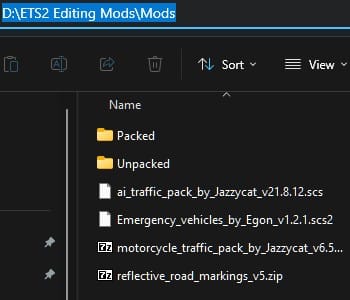
Put any mod file (
.scs,.zip,.rar,.7z) directly inside theModsfolder: x:\ETS2-ATS Editing Mods\ModsThat’s it – no need to extract anything manually! 🎉
Step 2: Unpack a Mod
Double-click
Unpack - Pack SCS Files.batType 1 and press Enter
A file browser opens – select your file from the
ModsfolderThe tool automatically:
🔍 Detects the file type
🛠️ Uses the correct method (7-Zip or
scs_packer.exe)📋 If it’s an archive with multiple
.scsfiles, it shows a menu:

Press A to unpack all files at once (shows progress like
[1/3],[2/3],[3/3])Press a number (1, 2, 3) to unpack a single file
After unpacking a single file, you can choose to unpack another from the same archive
All files are extracted to the right folders in
Mods\Unpacked\Check
SCS Unpacking Log.txtfor details
Step 3: Edit Your Files
Navigate to
Mods\Unpacked\your_mod_name\Edit any files you need (spawn ratios, textures, definitions, models, etc.)
Remember: Files must stay directly inside the mod folder, not in subfolders
Step 4: Pack Your Modified Mod
Double-click the batch file again
Type 2 and press Enter
A folder browser opens – select the mod folder you edited (from
Mods\Unpacked\)Choose output format:
1 = Pack to
.scs(for use in ETS2) 🎮2 = Pack to archive (
.zip,.rar, or.7z) for sharing or backup 💾
For
.scsformat:Type Y for compression (most mods) or N for no compression (sound mods)
The tool remembers if the original was uncompressed and suggests the right choice 💡
For archive format:
Choose 1 for
.zip, 2 for.rar, or 3 for.7z
Your new file appears in
Mods\Packed\Check
SCS Packing Log.txtfor details
Step 5: Use Your Mod in Game
Copy the packed file from
Mods\Packed\to your game’s mod folder:Documents\Euro Truck Simulator 2\mod\ if the mod was downloaded outside Steam Workshop.- x:\Steam Games\steamapps\workshop\content\227300 if the mod was downloaded within Steam Workshop.
IMPORTANT: remember to name the edited mod exactly the same than the original mod and delete or overwrite the original one if prompted when moving the edited mod into its correct folder to make it visible for the ETS2 in game mod manager.
Enable it in the Mod Manager and test! 🚛
💡 Pro Tips
One tool for everything – our batch file handles all 5 file types automatically
No need to pre-extract anything – just put files in
Modsand run the toolProgress indicators – when unpacking multiple files, you’ll see
[1/3],[2/3],[3/3]countersFor sound mods, always choose NO compression when packing at less the original was compressed (the tool will suggest/mirror the original compressed or uncompressed state)
7-Zip must be installed – the tool uses it for all archive operations, plus some mods use this compressing format.
📝 Important Notes
Log files are created automatically – check them if something goes wrong
The tool automatically creates all needed folders (
Mods,Unpacked,Packed)If a mod folder is empty after unpacking, the tool deletes it
The tool remembers if a mod was originally uncompressed and suggests the correct setting
For archives with multiple
.scsfiles, you can:Press A to unpack all at once
Press a number to unpack individually
After unpacking one, you can choose to unpack another from the same archive
❓ Troubleshooting
| Problem | Likely Cause | Solution |
|---|---|---|
| “File not found” | File not in Mods folder | Move your file to x:\ETS2-ATS Editing Mods\Mods |
| “7-Zip not found” | 7-Zip not installed | Install 7-Zip from 7-zip.org |
| Batch won’t run | Windows blocked it | Right-click file → Properties → Check “Unblock” |
| Security warning appears | First time running batch | Verify on VirusTotal, then uncheck “Always ask” and click Run |
| Can’t select folder in pack mode | Wrong starting folder | Make sure you’re selecting from Mods\Unpacked\ |
| Packed file is 0 bytes | Empty folder or wrong compression | Check folder has files, try “no” compression |
| Archive extraction produces no files | Corrupted or password-protected | Check archive manually with 7-Zip |
📚 Summary
Create
x:\ETS2-ATS Editing Mods\withscs_packer.exeand the batch fileInstall 7-Zip (required for archives)
Place any mod file (
.scs,.zip,.rar,.7z) in theModsfolderRun the batch file – Option 1 to unpack (press A to unpack all if multiple files)
Edit files in
Mods\Unpacked\mod_name\Run the batch file – Option 2 to pack
Copy the result from
Mods\Packed\to your game’s mod folder
Happy modding! 🚛💨 Remember to always credit original authors and keep your modifications for personal use unless you have explicit permission to share.
